Faster online training using plans
- By Bruno F -
- April 10, 2026
There is a new version of the training plans. Take a look at it here.
Do you want to be more efficient when planning online training?
A plan is a series of sessions that you create before and that you ‘save for later’, so that you can assign it to your clients.
Coaches can use the plans when some clients require the same training or exercises. Also, if they have plans already made and that work, they can use it with other clients in a simple way.
With Trainerplan, after Create your plan, you can assign it to a client, several or entire groups and make the adjustments to customize it if you wish, so that you do not have to rework the same workouts every time.
Save time if you have multiple clients who need the same training or similar.
This is how you can better manage your customers with the online training platform
1. The first step is to go to the ‘Plans’ section of the library. Then click ‘Add Plan’.

2. Then select the type of activity, add a title and/or description and select the number of weeks you want for the plan.
Click on the button to add training (‘+’) on the day you want and when the window opens, choose ‘Library’ and then ‘Plans’.
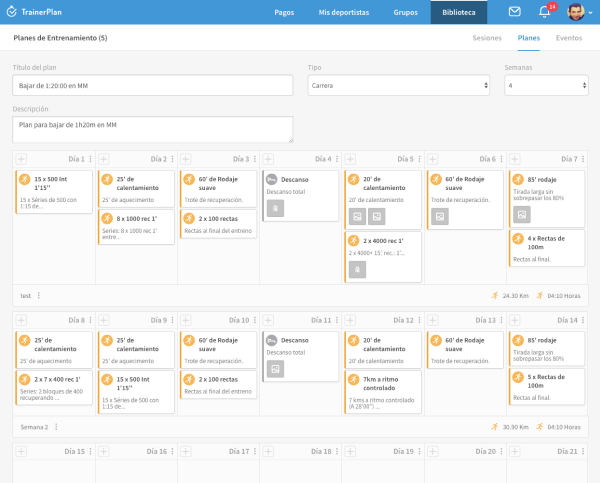
3. After saving the plan, select the athlete or group you want from your customer list.
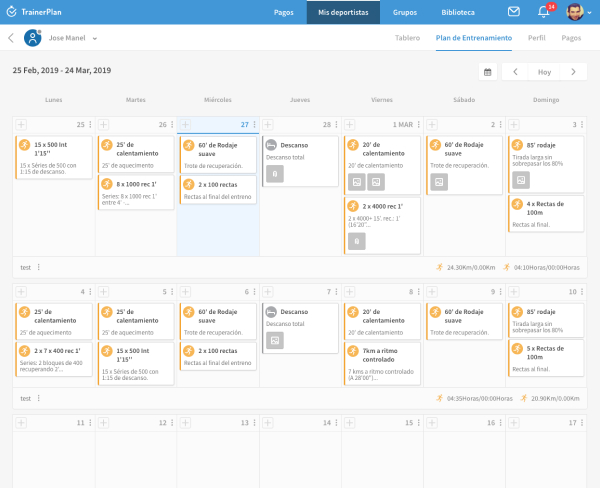
There you will find the plan you have made. Select it and click ‘Add’.

4. Ready. The plan will appear on your athlete’s calendar or an entire group.
If you don’t have a TrainerPlan account yet, make yourself one free. If you already have an account, you can now start training using the most intuitive online training software on the market, and totally in your language. enter your account and Create a plan now.